Top 5 features of Visual Studio 2019

Updated: Apr 3, 2019
Visual Studio 2019 which was launched today (April 02) comes with loads of new features, which would delight the developers. Here are the top 5 features that I think which would really make a difference.
1. Get to code faster
When you launch VS 2019, you will almost immediately be presented with the options to a screen to select what you want to do with your recent projects list. The wait time to get into Visual studio has significantly been reduced so that one can start coding faster.
The new experience of creating a new project is refreshing and

2. IntelliCode Extension
This is basically an improvement over standard IntelliSense, and it now uses AI/ML to present you starred options instead of just an alphabetical list, when you hit dot key or use Ctrl-Space option.

The default suggestions are based on trends from top ranked open source code bases. There is also an option to create a custom model by using your existing code base as training data.
3. Live Share
Collaboration is taken to a new level with live share option, which allows you to share your Visual studio environment with context with another peer using a simple link. You can give either Edit or Read-Only access to up to 30 people. Everything runs on the host machine and is forwarded onto peer systems, so your peers do not need to setup anything locally or even need to install any dependencies besides Visual Studio.

This even works cross-platform between a Mac and Windows systems. This feature opens up lot of possibilities not just for peer reviews and remote debugging but also hands-on training use cases.
4. Data breakpoints
This is not exactly a new feature as it was available for C++ development in Visual Studio. This is now made available for C# development, if you are using .Net Core 3.0. This lets you add dynamic breakpoints based on one of the property of your variables available in the watch window.

Data breakpoints are particularly useful for complex programs where you may not know the exact point to debug but you know the properties which are contributing to the failures.
5. Azure DevOps and Git integration
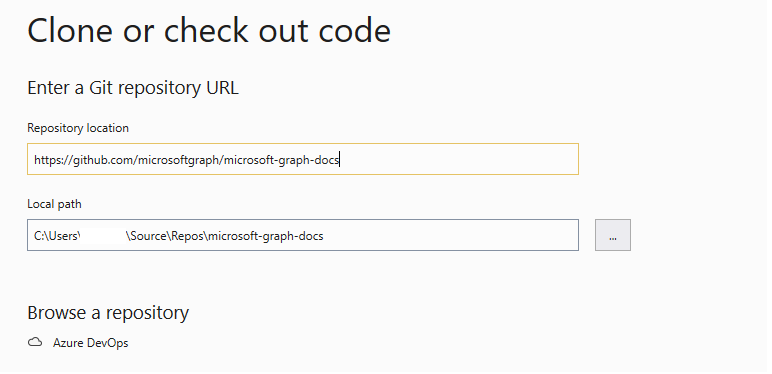
Visual Studio 2019 clubbed with Github plugin makes common Git tasks like cloning, forking and pull requests as straight forward as TFS check-ins. Looks like MS is slowly bringing some consistency and uniformity between the two supported version controls.

Did you try out Visual Studio 2019 yet, which features did you like the most ?
Comment below and let me know. Happy Coding !!
VS 2019 Download
More Information
Nice Info ! Helpful to getting start with .
Nice info! I wonder where else AI/ML has been added apart from IntelliCode.